Telegram
Telegram
Telegram
Redesign
Redesign
Redesign
Overview
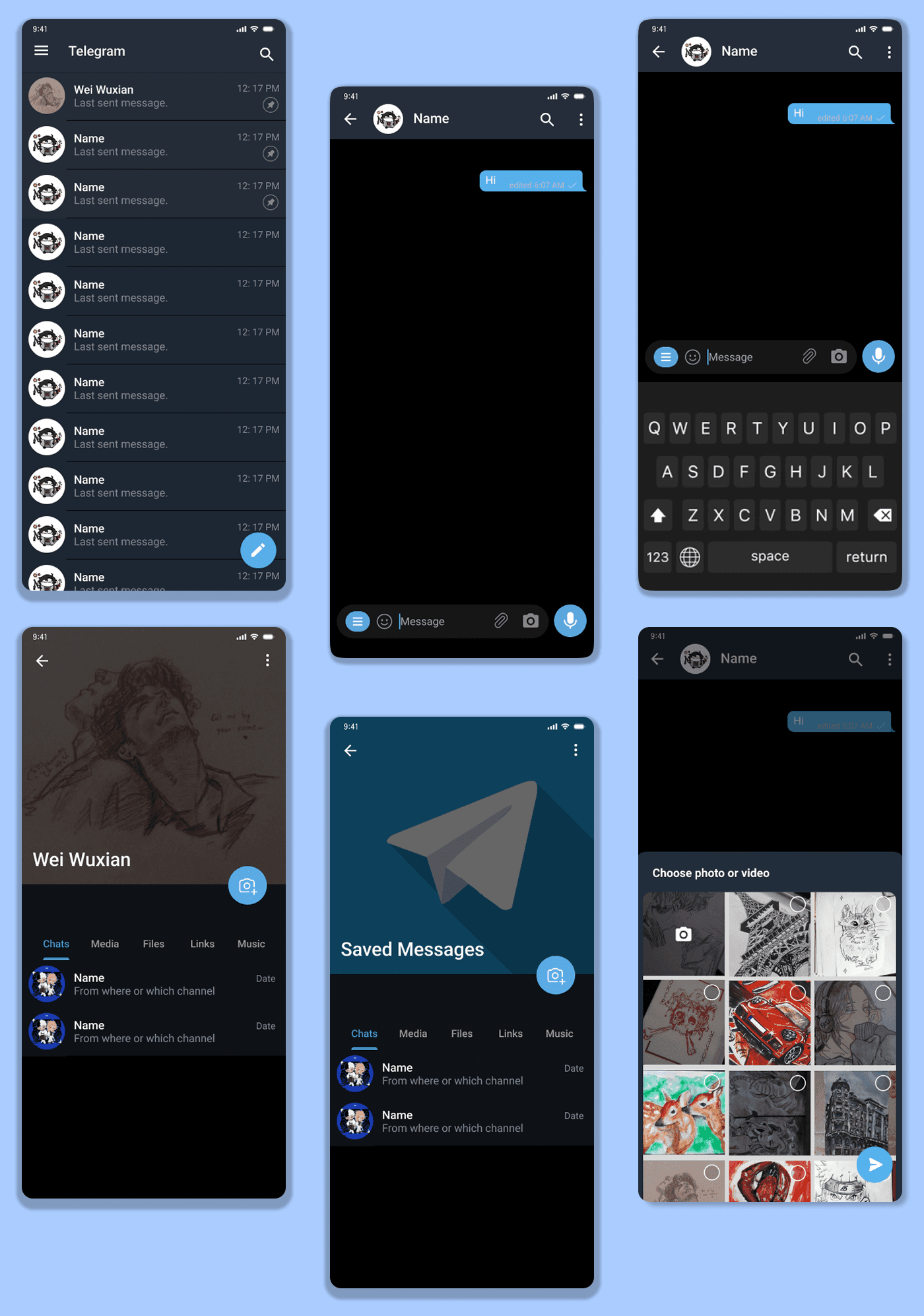
This Telegram redesign project focuses on improving everyday usability for power users by reducing friction, increasing personalization, and enhancing organization—without compromising Telegram’s simplicity. As a long-term user, I noticed that while Telegram is feature-rich, some high-frequency actions and personal spaces could feel cluttered or generic over time. To address this, I redesigned four key areas: the message bar to shorten the flow for sharing media, a personalized Saved Messages makeover to make it feel more meaningful, customizable Lists within Saved Messages for better organization, and a category-based chat system to help users navigate conversations more efficiently. Together, these changes aim to make Telegram faster, more personal, and easier to manage for users who rely on it daily.
This Telegram redesign project focuses on improving everyday usability for power users by reducing friction, increasing personalization, and enhancing organization—without compromising Telegram’s simplicity. As a long-term user, I noticed that while Telegram is feature-rich, some high-frequency actions and personal spaces could feel cluttered or generic over time. To address this, I redesigned four key areas: the message bar to shorten the flow for sharing media, a personalized Saved Messages makeover to make it feel more meaningful, customizable Lists within Saved Messages for better organization, and a category-based chat system to help users navigate conversations more efficiently. Together, these changes aim to make Telegram faster, more personal, and easier to manage for users who rely on it daily.
About Project
01
My Role
Product Designer (Solo Project)
01
My Role
Product Designer (Solo Project)
01
My Role
Product Designer (Solo Project)
02
Process
Analyse Problem Statement → UX Reseach → Competitive Analysis → User Personas → Task Flows → Moodboards and Visual Direction → Wireframes (Lo - Fi) → Component Library → UI Design → Prototyping → Usability Evaluation
02
Process
Analyse Problem Statement → UX Reseach → Competitive Analysis → User Personas → Task Flows → Moodboards and Visual Direction → Wireframes (Lo - Fi) → Component Library → UI Design → Prototyping → Usability Evaluation
02
Process
Analyse Problem Statement → UX Reseach → Competitive Analysis → User Personas → Task Flows → Moodboards and Visual Direction → Wireframes (Lo - Fi) → Component Library → UI Design → Prototyping → Usability Evaluation
03
Tools
Figma, Framer, Canva, Notion
03
Tools
Figma, Framer, Canva, Notion
03
Tools
Figma, Framer, Canva, Notion
Pain Points
High-friction message actions
Frequently used actions like sending images or opening the camera require extra taps, slowing down everyday conversations.
High-friction message actions
Frequently used actions like sending images or opening the camera require extra taps, slowing down everyday conversations.
Saved Messages feels generic and cluttered
Saved Messages is heavily used as a personal space, but it lacks personalization and structure, making it hard to feel ownership or quickly find content.
Saved Messages feels generic and cluttered
Saved Messages is heavily used as a personal space, but it lacks personalization and structure, making it hard to feel ownership or quickly find content.
No internal organization within Saved Messages
Users save music, links, files, notes, and media in one continuous feed, which makes retrieval frustrating over time.
No internal organization within Saved Messages
Users save music, links, files, notes, and media in one continuous feed, which makes retrieval frustrating over time.
Difficulty navigating large chat lists
As users join more groups, bots, and channels, the chat list becomes crowded, making it hard to focus on what matters at a given moment.
Difficulty navigating large chat lists
As users join more groups, bots, and channels, the chat list becomes crowded, making it hard to focus on what matters at a given moment.
High cognitive load for power users
Power users rely on Telegram daily, but the lack of lightweight organization tools increases mental effort and time spent searching.
High cognitive load for power users
Power users rely on Telegram daily, but the lack of lightweight organization tools increases mental effort and time spent searching.
Problem Statement
Problem Statement
The problem targets actions users perform daily, such as sending media and accessing saved content, where even small inefficiencies compound over time.
Frequency
The problem targets actions users perform daily, such as sending media and accessing saved content, where even small inefficiencies compound over time.
Frequency
The problem targets actions users perform daily, such as sending media and accessing saved content, where even small inefficiencies compound over time.
Frequency
Telegram’s heavy users manage large volumes of chats and saved data, making organization and navigation critical to their experience.
Power Users
Telegram’s heavy users manage large volumes of chats and saved data, making organization and navigation critical to their experience.
Power Users
Telegram’s heavy users manage large volumes of chats and saved data, making organization and navigation critical to their experience.
Power Users
The problem improves usability while preserving Telegram’s core values of simplicity, speed, and minimalism.
Alignment
The problem improves usability while preserving Telegram’s core values of simplicity, speed, and minimalism.
Alignment
The problem improves usability while preserving Telegram’s core values of simplicity, speed, and minimalism.
Alignment
How might we reduce friction and improve organization in Telegram while preserving its simplicity and speed for everyday power users?
How might we reduce friction and improve organization in Telegram while preserving its simplicity and speed for everyday power users?
Success Metrics
01
Reduction in task completion time
Measure how quickly users can send media or access saved content compared to the previous flow.
01
Reduction in task completion time
Measure how quickly users can send media or access saved content compared to the previous flow.
01
Reduction in task completion time
Measure how quickly users can send media or access saved content compared to the previous flow.
02
Decrease in navigation errors or backtracking
Track fewer mis-taps, unnecessary swipes, or repeated scrolling when users search for chats or saved items.
02
Decrease in navigation errors or backtracking
Track fewer mis-taps, unnecessary swipes, or repeated scrolling when users search for chats or saved items.
02
Decrease in navigation errors or backtracking
Track fewer mis-taps, unnecessary swipes, or repeated scrolling when users search for chats or saved items.
03
Increase in Saved Messages engagement
Higher usage of Saved Messages features such as Lists, customization, and categorized saving.
03
Increase in Saved Messages engagement
Higher usage of Saved Messages features such as Lists, customization, and categorized saving.
03
Increase in Saved Messages engagement
Higher usage of Saved Messages features such as Lists, customization, and categorized saving.
04
Adoption rate of custom categories and lists
Percentage of users who create and actively use chat categories or Saved Message Lists.
04
Adoption rate of custom categories and lists
Percentage of users who create and actively use chat categories or Saved Message Lists.
04
Adoption rate of custom categories and lists
Percentage of users who create and actively use chat categories or Saved Message Lists.
Features
Features
Overview
Overview
Overview
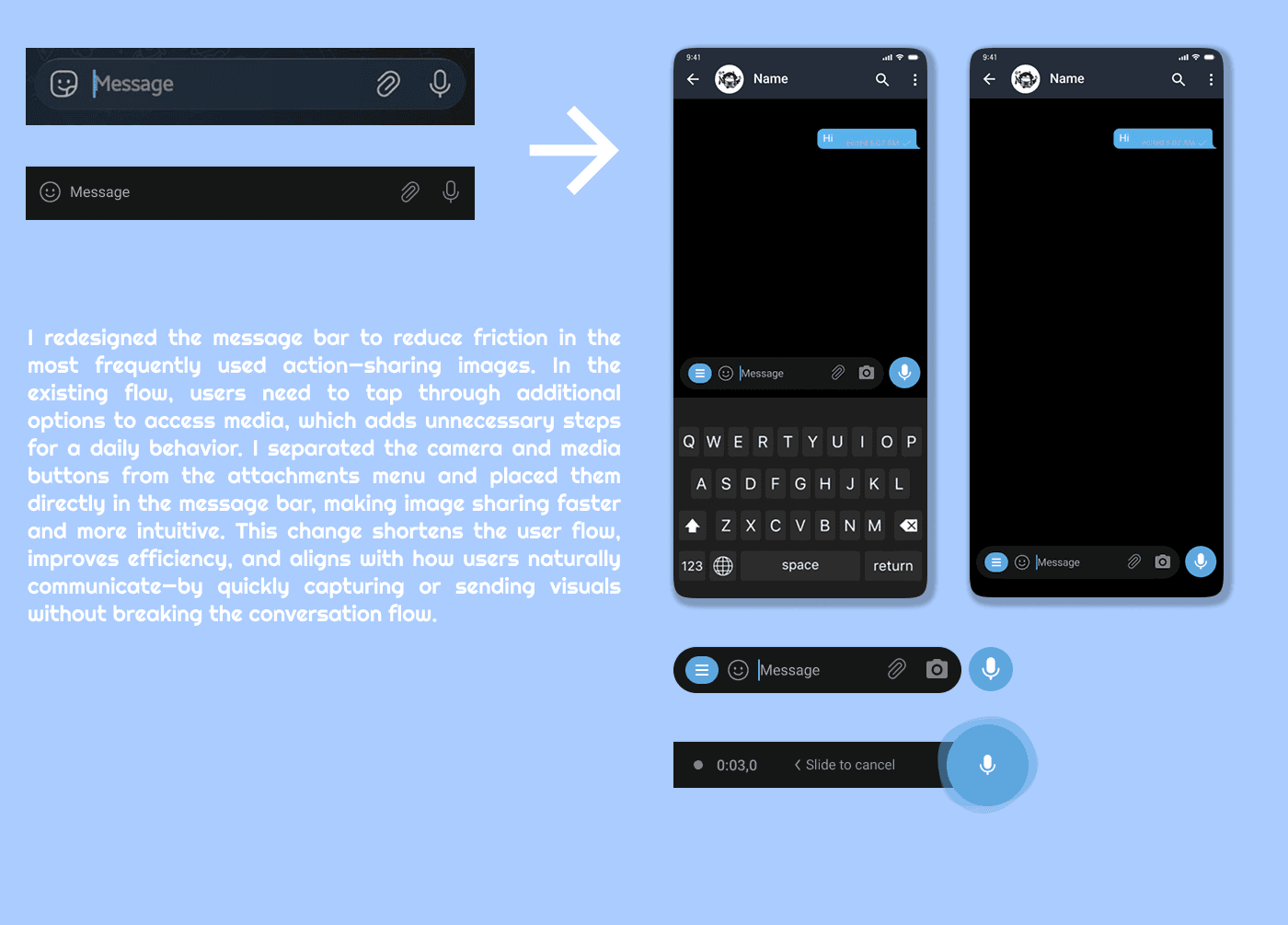
The above video showcase the demonstation of the Message bar I have redesigned to reduce the friction in sending media.
The above video showcase the demonstation of the Message bar I have redesigned to reduce the friction in sending media.
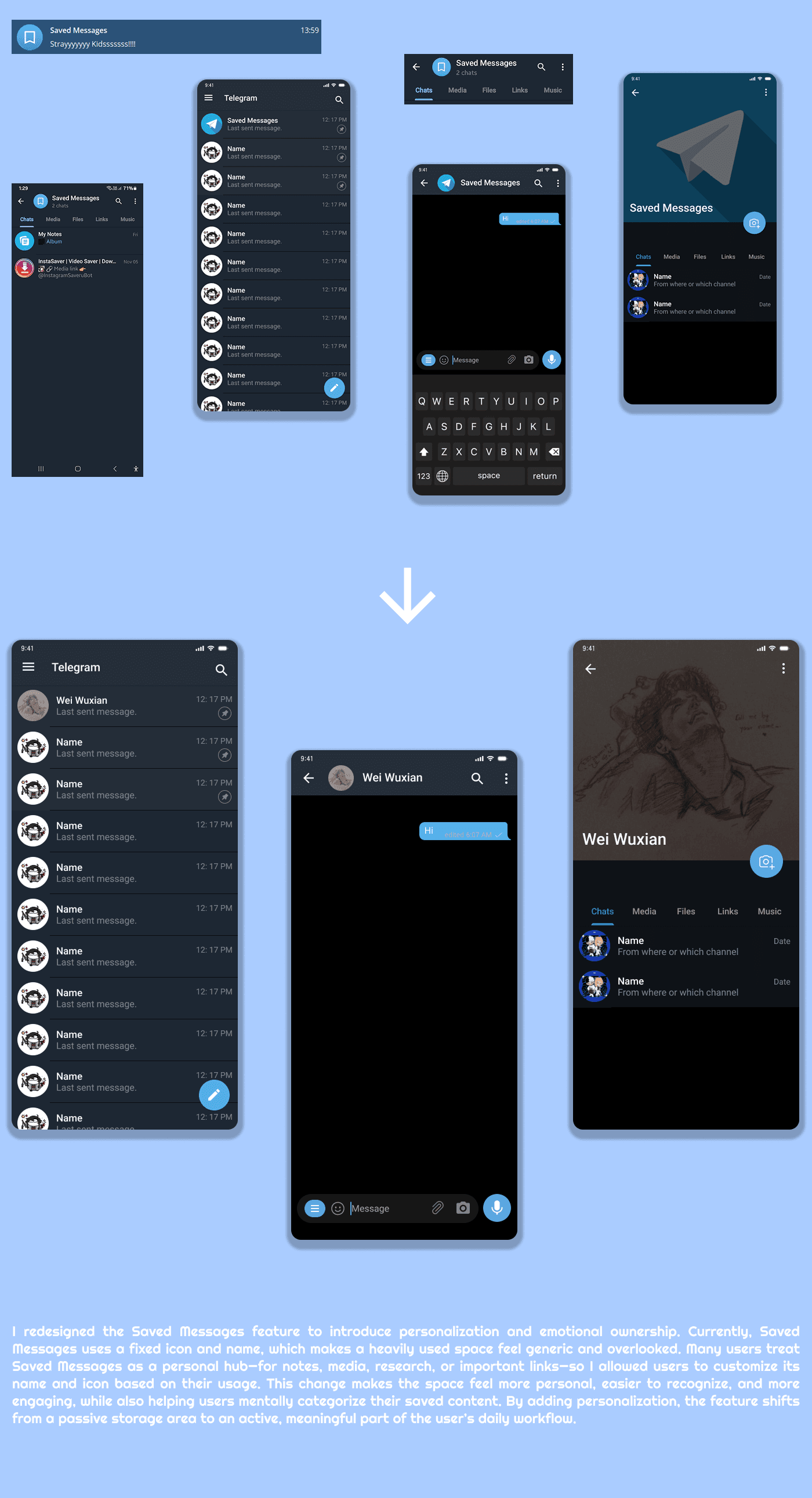
The above video showcase the Personalization of the Saved Messages feature of Telegram to make the app feel more home like.
The above video showcase the Personalization of the Saved Messages feature of Telegram to make the app feel more home like.
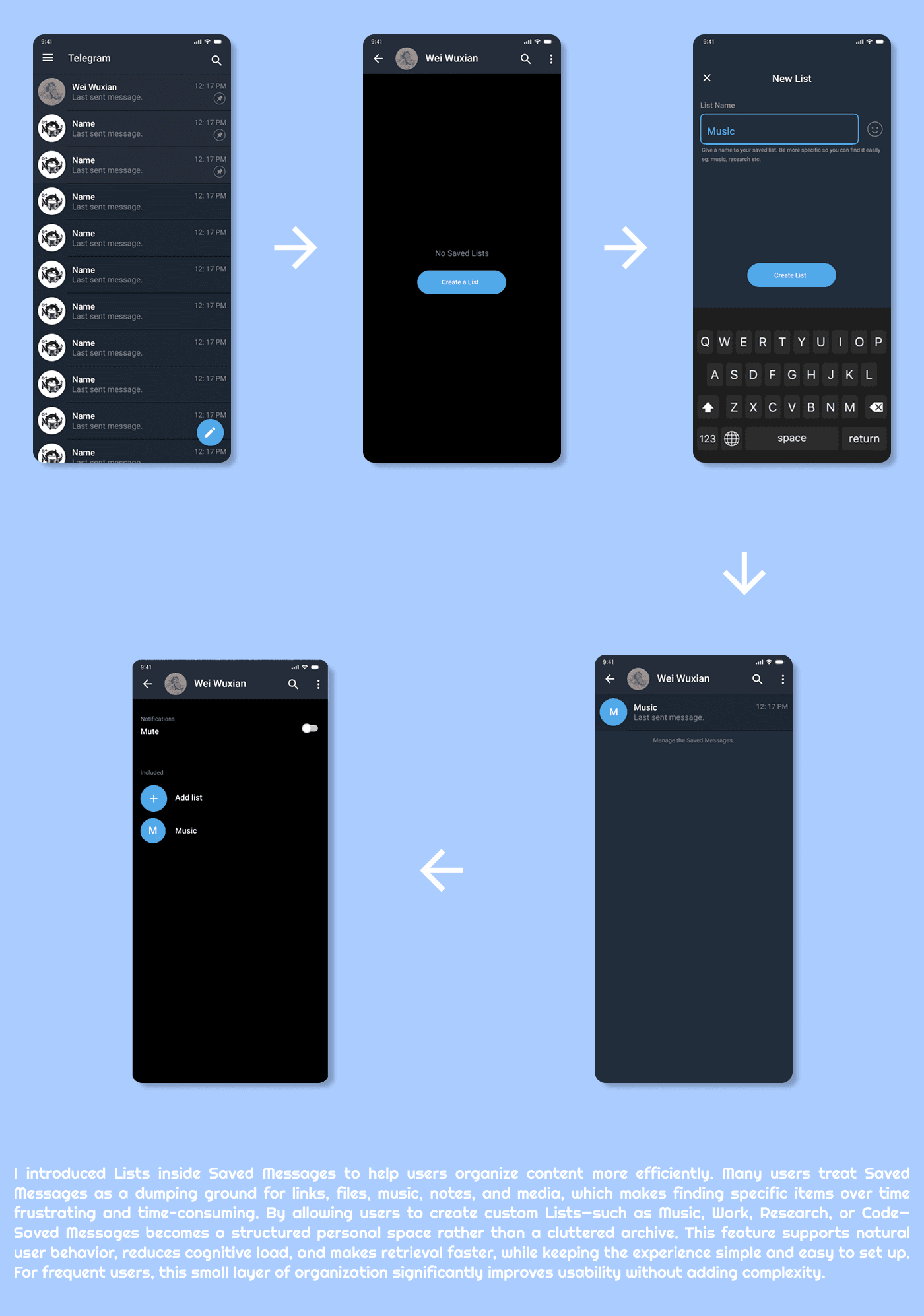
The above video showcase the feature I added to make the Saved Messages more organized. I did it because I and many other users treat Saved messages to organize or save their important work all over the chats .
The above video showcase the feature I added to make the Saved Messages more organized. I did it because I and many other users treat Saved messages to organize or save their important work all over the chats .
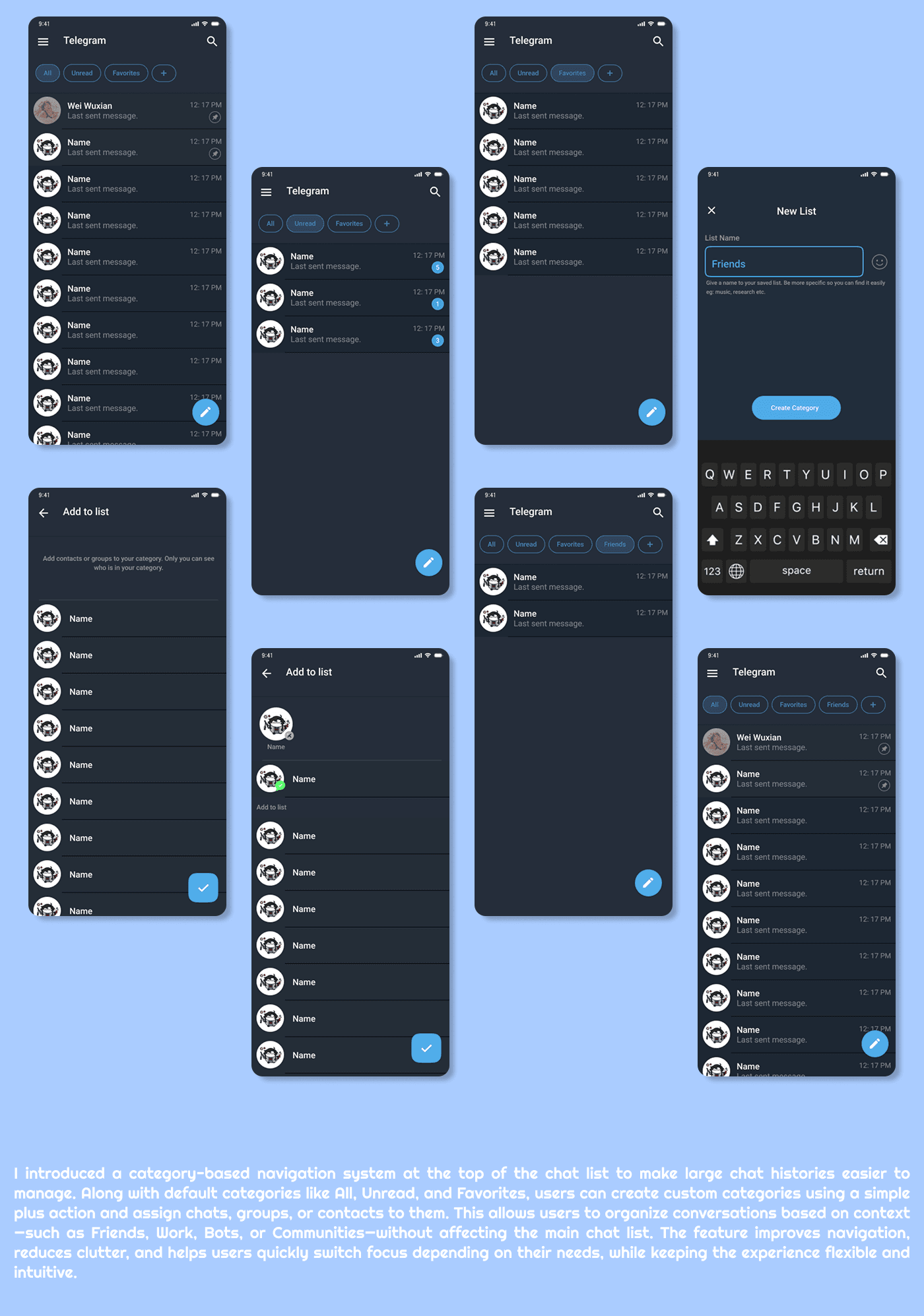
The above video showcase the categorization of many chats. Telegram is not specific to 1 field that is messaging. Telegram have many bots, groups, channels and the private contacts. Their can be category based on personal taste and preferences also like friends, unread, manhwa groups, office related, online friends and so on.
The above video showcase the categorization of many chats. Telegram is not specific to 1 field that is messaging. Telegram have many bots, groups, channels and the private contacts. Their can be category based on personal taste and preferences also like friends, unread, manhwa groups, office related, online friends and so on.
Results
Faster daily interactions
The Savori app successfully delivers a fast, minimal, and luxury-focused drink-buying experience for high-end users. Usability testing showed that the core flow—finding, customizing, and purchasing a drink—was smooth and intuitive, with only minor fixes needed for clarity. The final design balances premium aesthetics with simple navigation, proving that an exclusive, high-end service can still be effortless and clutter-free.
Improved content organization and retrieval
By reducing unnecessary steps, users now complete the entire process significantly faster. This streamlined flow enhances convenience for premium users who value speed and efficiency.
Lower cognitive load for power users
Visual cues, tone, and subtle design elements create a mood-driven experience that feels luxurious and intentional. Users navigate confidently because the interface “feels” right, not just looks clean.
Increased sense of ownership and engagement
From typography to spacing, every element reinforces a high-end identity. The design feels curated and personal, like a boutique service built for selective, refined customers.
Scalable system without added complexity
By blending minimalism with luxury, the app stands out from traditional drink-buying platforms. It positions itself as a sophisticated, exclusive space for users who want more than just convenience.
Faster daily interactions
The Savori app successfully delivers a fast, minimal, and luxury-focused drink-buying experience for high-end users. Usability testing showed that the core flow—finding, customizing, and purchasing a drink—was smooth and intuitive, with only minor fixes needed for clarity. The final design balances premium aesthetics with simple navigation, proving that an exclusive, high-end service can still be effortless and clutter-free.
Improved content organization and retrieval
By reducing unnecessary steps, users now complete the entire process significantly faster. This streamlined flow enhances convenience for premium users who value speed and efficiency.
Lower cognitive load for power users
Visual cues, tone, and subtle design elements create a mood-driven experience that feels luxurious and intentional. Users navigate confidently because the interface “feels” right, not just looks clean.
Increased sense of ownership and engagement
From typography to spacing, every element reinforces a high-end identity. The design feels curated and personal, like a boutique service built for selective, refined customers.
Scalable system without added complexity
By blending minimalism with luxury, the app stands out from traditional drink-buying platforms. It positions itself as a sophisticated, exclusive space for users who want more than just convenience.
Faster daily interactions
The Savori app successfully delivers a fast, minimal, and luxury-focused drink-buying experience for high-end users. Usability testing showed that the core flow—finding, customizing, and purchasing a drink—was smooth and intuitive, with only minor fixes needed for clarity. The final design balances premium aesthetics with simple navigation, proving that an exclusive, high-end service can still be effortless and clutter-free.
Improved content organization and retrieval
By reducing unnecessary steps, users now complete the entire process significantly faster. This streamlined flow enhances convenience for premium users who value speed and efficiency.
Lower cognitive load for power users
Visual cues, tone, and subtle design elements create a mood-driven experience that feels luxurious and intentional. Users navigate confidently because the interface “feels” right, not just looks clean.
Increased sense of ownership and engagement
From typography to spacing, every element reinforces a high-end identity. The design feels curated and personal, like a boutique service built for selective, refined customers.
Scalable system without added complexity
By blending minimalism with luxury, the app stands out from traditional drink-buying platforms. It positions itself as a sophisticated, exclusive space for users who want more than just convenience.